


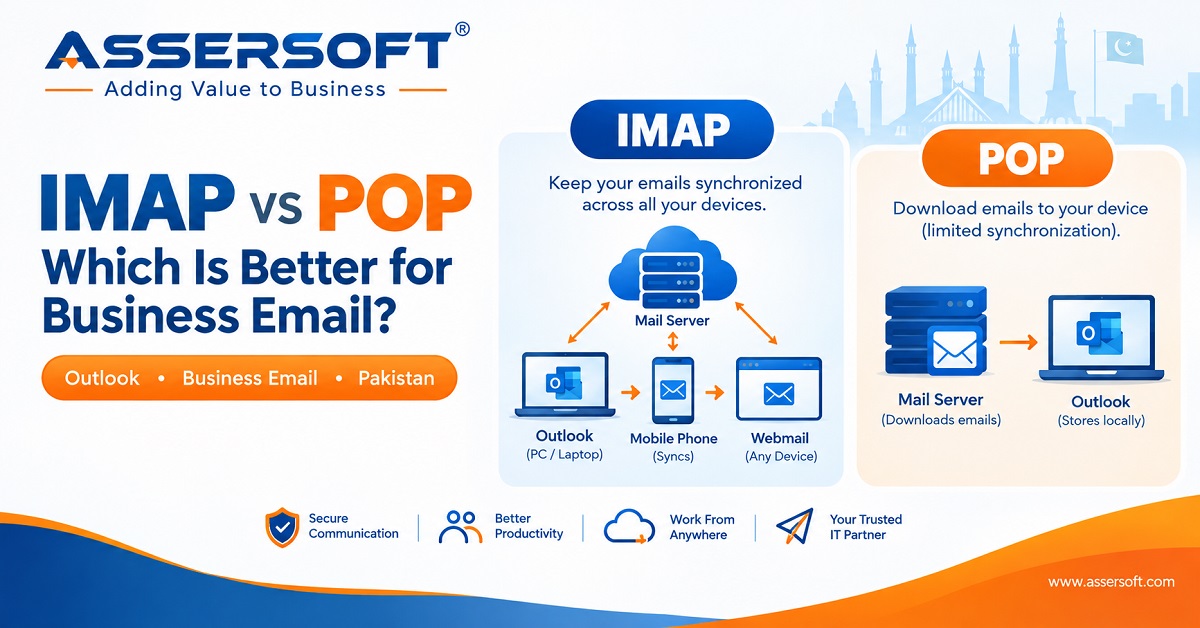
IMAP or POP in Outlook: Which Is Better for Business Emails in Pakistan?
For businesses in Pakistan, professional email is an essential part of everyday communication. Whether you are using an email address such as info@yourcompany.com, sales@yourcompany.com, or accounts@yourcompany.com, choosing the right email protocol can affect how your team accesses, manages, and protects business emails.
When setting up a business email account in Microsoft Outlook, you may be asked to choose between IMAP and POP.
So, which one should your business use?
For most modern businesses, IMAP is the better choice because it keeps your emails synchronized across multiple devices. POP can still be useful in specific situations, particularly when emails need to be downloaded and stored locally.
Let’s understand the difference.
What Is IMAP?
IMAP (Internet Message Access Protocol) allows Outlook to access emails directly from the mail server while keeping your messages synchronized.
For example, if you receive an email on your business account and read it using Outlook on your office computer, the email status can also be reflected when you access the same account from your laptop or mobile phone.
With IMAP:
- Emails remain stored on the mail server.
- Messages can be accessed from multiple devices.
- Read, unread, replied, and deleted status can synchronize.
- Email folders can remain synchronized.
- You can access the same mailbox through Outlook, webmail, and other supported devices.
- It is suitable for employees who work from different locations.
Example
Suppose your company uses:
Your sales manager checks email from:
- Outlook on the office PC
- Outlook on a laptop
- Mobile phone
- Webmail when travelling
With IMAP, these devices can work with the same mailbox and maintain synchronization.
This makes IMAP particularly suitable for today’s business environment.
What Is POP?
POP (Post Office Protocol) works differently.
Instead of continuously synchronizing the mailbox with the server, POP is primarily designed to download emails from the mail server to an email application such as Outlook.
Depending on the Outlook and mail-server configuration, downloaded emails may be removed from the server or retained for a specified period.
POP can therefore be useful when a business wants email messages to be primarily stored on a particular computer.
However, this approach can create problems when the same mailbox is accessed from multiple devices.
IMAP vs POP for Business Email
| Feature | IMAP | POP |
|---|---|---|
| Email synchronization | Yes | Limited |
| Multiple devices | Excellent | Not ideal |
| Emails stored on server | Yes | Usually downloaded |
| Outlook + mobile access | Suitable | Less suitable |
| Folder synchronization | Yes | Limited |
| Suitable for modern businesses | Generally yes | Specific situations |
| Local email storage | Possible with Outlook | Common |
| Risk of inconsistent mailboxes | Lower | Higher |
Why IMAP Is Usually Better for Pakistani Businesses
Many businesses in Pakistan now use email from offices, homes, mobile phones, laptops, and multiple branches.
For example, a company may have an employee working from Lahore who occasionally travels to Karachi or Islamabad. The employee may need to access the same business mailbox from a laptop and mobile phone.
IMAP makes this much easier because the mailbox remains synchronized with the server.
This is especially useful for:
1. Employees Using Multiple Devices
If employees regularly switch between computers, laptops, and smartphones, IMAP provides a more consistent email experience.
2. Remote and Hybrid Work
Business communication is no longer limited to the office. Employees may need to access company email while working remotely or travelling.
IMAP allows the same mailbox to be accessed from supported devices.
3. Shared Business Mailboxes
Addresses such as:
may need to be accessed by different team members or applications.
A properly configured server-based mailbox makes centralized email management easier.
4. Webmail and Outlook Together
Businesses often use Outlook in the office while using webmail when travelling or when Outlook is unavailable.
With IMAP, these access methods can remain synchronized with the mailbox stored on the server.
When Does POP Make Sense?
POP is not necessarily wrong. There are situations where it may still be appropriate.
For example, a business may have a legacy application or workflow where emails are intended to be downloaded to a single computer.
POP may also be considered when:
- Email is primarily accessed from one computer.
- Local storage is an important requirement.
- A business has a specific legacy email setup.
- The organization deliberately wants downloaded mail to be stored locally.
- The email administrator has configured the system specifically for POP.
However, businesses should understand the consequences before choosing POP.
If an employee downloads emails to one computer and that computer fails without a proper backup, recovering locally stored emails can become difficult.
What About Email Storage?
One important consideration when using IMAP is mailbox storage.
Because messages remain on the server, businesses need to monitor mailbox storage limits.
For example, if your hosting account provides a limited amount of disk space and employees keep thousands of emails with large attachments, the mailbox can eventually consume significant storage.
A business email management strategy should therefore include:
- Regular mailbox monitoring
- Appropriate storage limits
- Email retention policies
- Attachment management
- Backups where required
- Removal or archiving of unnecessary emails
IMAP Does Not Replace Email Backup
It is important to understand that IMAP synchronization is not the same thing as backup.
If an email is deleted from an IMAP mailbox, the deletion may synchronize across connected devices.
Therefore, businesses that depend heavily on email should consider an appropriate backup or email archiving strategy.
For important business records, relying only on Outlook’s local copy or the mail server may not be sufficient.
What Should a Business in Pakistan Choose?
For most businesses using Outlook today, IMAP is generally the more practical choice when using traditional business email hosting.
It provides better synchronization and makes it easier to access the same mailbox from Outlook, mobile devices, and webmail.
POP can still be appropriate for specific requirements, but it should be selected deliberately rather than simply because it is available in the email setup.
A Simple Rule
Choose IMAP if:
- You use multiple devices.
- You want email synchronized across devices.
- Employees work remotely.
- You use Outlook and webmail.
- You want emails to remain on the server.
Consider POP if:
- Email is primarily used on one computer.
- You specifically need local email storage.
- You have a legacy email requirement.
- Your IT administrator has designed the system around POP.
What About Microsoft 365 or Google Workspace?
If your business is using Microsoft 365 or Google Workspace, the recommended configuration may be different from traditional cPanel-based email hosting.
Modern cloud email services provide additional features such as centralized administration, security controls, authentication, spam protection, collaboration tools, and cloud-based mailbox management.
Therefore, businesses should first identify where their email is hosted before configuring Outlook.
Need Help Setting Up Business Email?
Choosing IMAP or POP is only one part of setting up reliable business email.
A professional email setup should also consider:
- Domain and DNS configuration
- MX records
- SPF
- DKIM
- DMARC
- SSL/TLS security
- Outlook configuration
- Mobile email configuration
- Mailbox storage
- Email migration
- Backup and recovery
- Spam and phishing protection
At Assersoft, we help businesses with website development, business email setup, hosting-related requirements, technical support, and ongoing digital solutions.
Since 2004, Assersoft has helped organizations build and maintain digital platforms with a focus on reliability, accountability, and long-term support.
Need Help With Your Business Email?
Whether your company uses cPanel email, Microsoft 365, Google Workspace, or another business email platform, our team can help you review your current setup and configure it appropriately for your business needs.
Contact Assersoft today for professional business email setup and technical support.